
Parabolic SAR
This lesson will cover the following
- What is the Parabolic SAR
- What does it tell us
- How is it calculated
- What to combine it with
- What signals does it generate
The Parabolic Stop and Reverse (SAR) is a trend-following indicator that is used to identify price reversals effectively. Being able to utilise the SAR properly allows a trader to determine the direction of the trend, to spot suitable entry and exit points, and to assist in placing trailing stops.
It is visualised by a series of dots or dashes that are placed either beneath or above the price action, depending on the market trend. When the two cross, a signal is generated indicating that the current trend is probably coming to an end, thus suggesting that we should close any open positions.
The series of dots, which visualise the SAR, is positioned at a certain distance below the price action when the market is trending upwards. Logically, during a downtrend, the Parabolic SAR appears above the price action, again at a set distance.
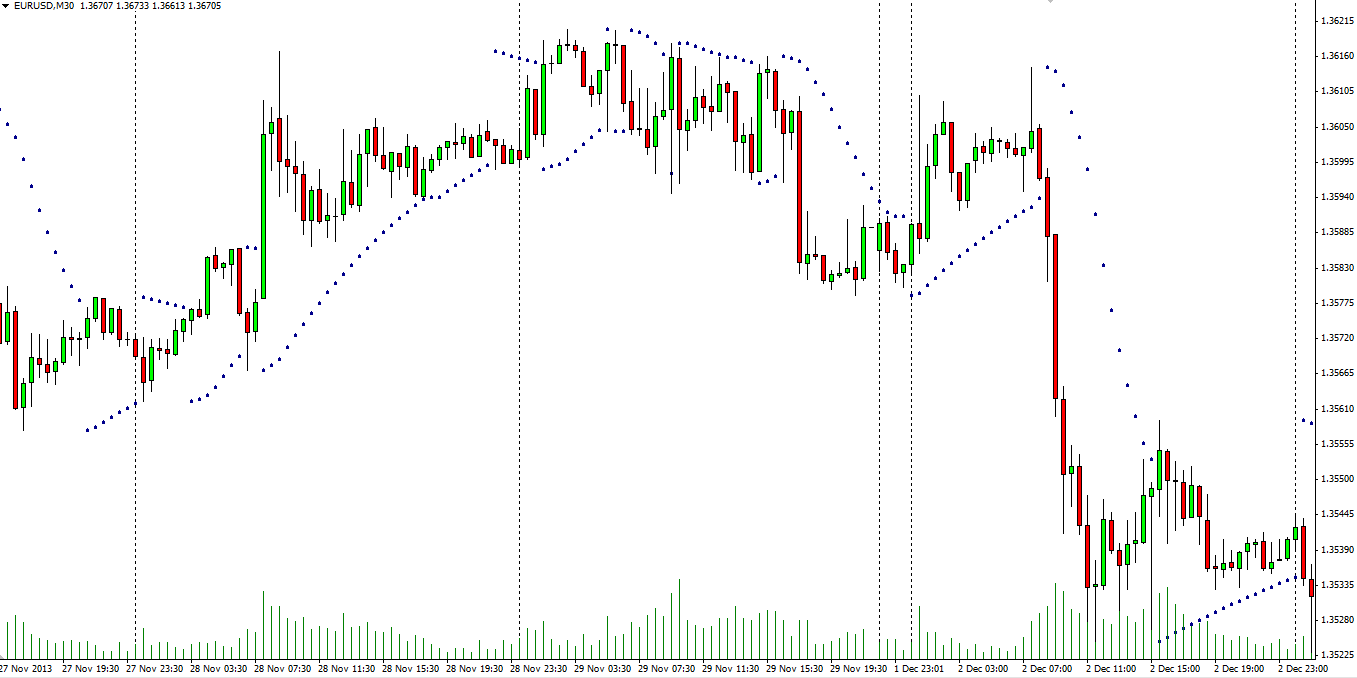
The Parabolic SAR has two parameters that can be fine-tuned according to traders’ preferences: the step value (how much the SAR will increase when a new extreme occurs) and the maximum value of the indicator. We will discuss these later in the article.
Each trend has an end
 As we know, every trend is bound to end at some point. As the price movement approaches a reversal, the Parabolic SAR reduces its distance from the price action. The smaller the gap between the two, the nearer the possible price reversal and the more likely a crossover becomes.

- Trade Forex
- Trade Crypto
- Trade Stocks
- Regulation: NFA
- Leverage: Day Margin
- Min Deposit: $100
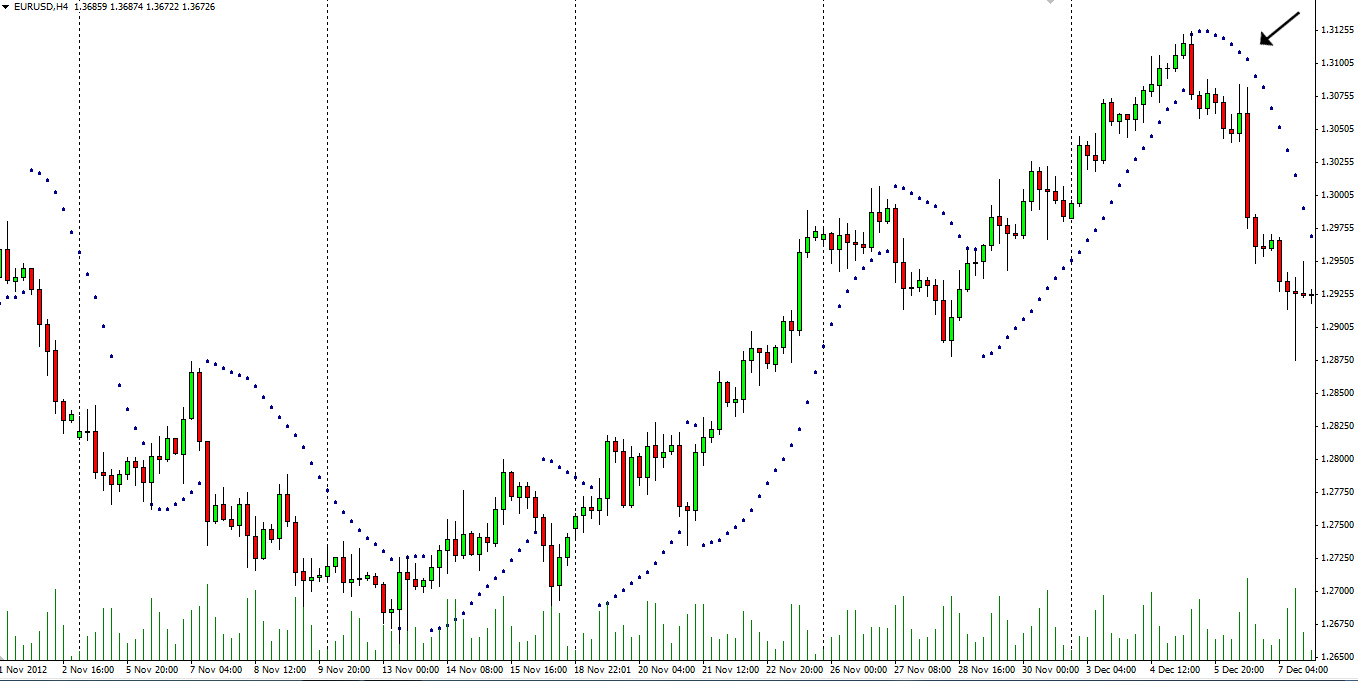
At that point, the dots visualising the SAR will begin to form on the opposite side of the price movement, thereby signalling that a reversal is under way. This would be an appropriate moment to consider closing a long position, once you have received confirmation. The screenshot below presents an uptrend that comes to an end and collides with the dots beneath it.
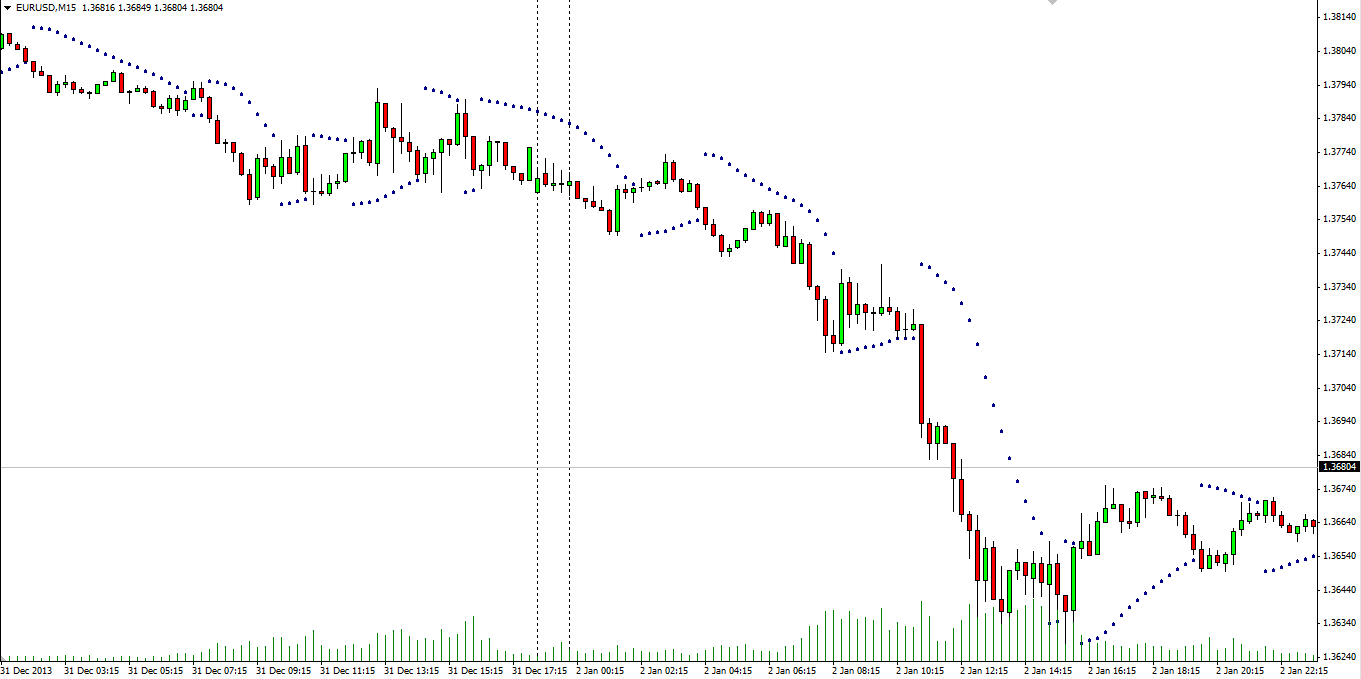
Naturally, the opposite scenario also holds true. When the market trends downwards, the SAR is plotted above the price action and, as soon as the trend begins to lose momentum, the distance to the indicator narrows and a crossover becomes likely. This is illustrated below.
Apart from identifying trend reversals, and therefore entry and exit points, the Parabolic SAR is also helpful for adjusting your trailing stop-loss. The indicator can be used to move the stop-loss as each new dot forms, which means that an unexpected price reversal will cause minimal harm, stopping you out in profit.
How is the parabolic SAR calculated
 The SAR is calculated using the following formula:
SARtomorrow = SARtoday + AF x (EPtrade-SARtoday)
AF’s default value is 0.020, and it is increased by 0.02 for each bar on which a new high/low is made, depending on the trend direction, until a value of 0.20 is reached. Extreme Price (EP) is the extreme high price for the trade if it is long, or the extreme low price for the trade if it is short.
In need of assistance
 The trending nature of the Parabolic SAR makes it a very successful tool in trending markets with long swings. The results, however, are far less satisfactory when the asset is trading sideways, as the short swings the price forms do not give us enough time to wait for confirmation of a price reversal, thus making it extremely risky to enter a position based solely on a hunch.
Traders most often combine the SAR with other indicators to improve its performance. Since the Parabolic SAR’s main purpose is to define the trend direction and detect any changes in it, it is wise to pair it with a strength-measuring indicator such as the Average Directional Movement Index (ADX).
You should avoid pairing the SAR with another trend-defining indicator, as this would only provide two sets of trend-confirmation signals. If, however, you use a tool to gauge the strength of the trend and, on that basis, conclude that it is strong enough, you can then use the Parabolic SAR to search for optimal entry and exit points during your trading session.
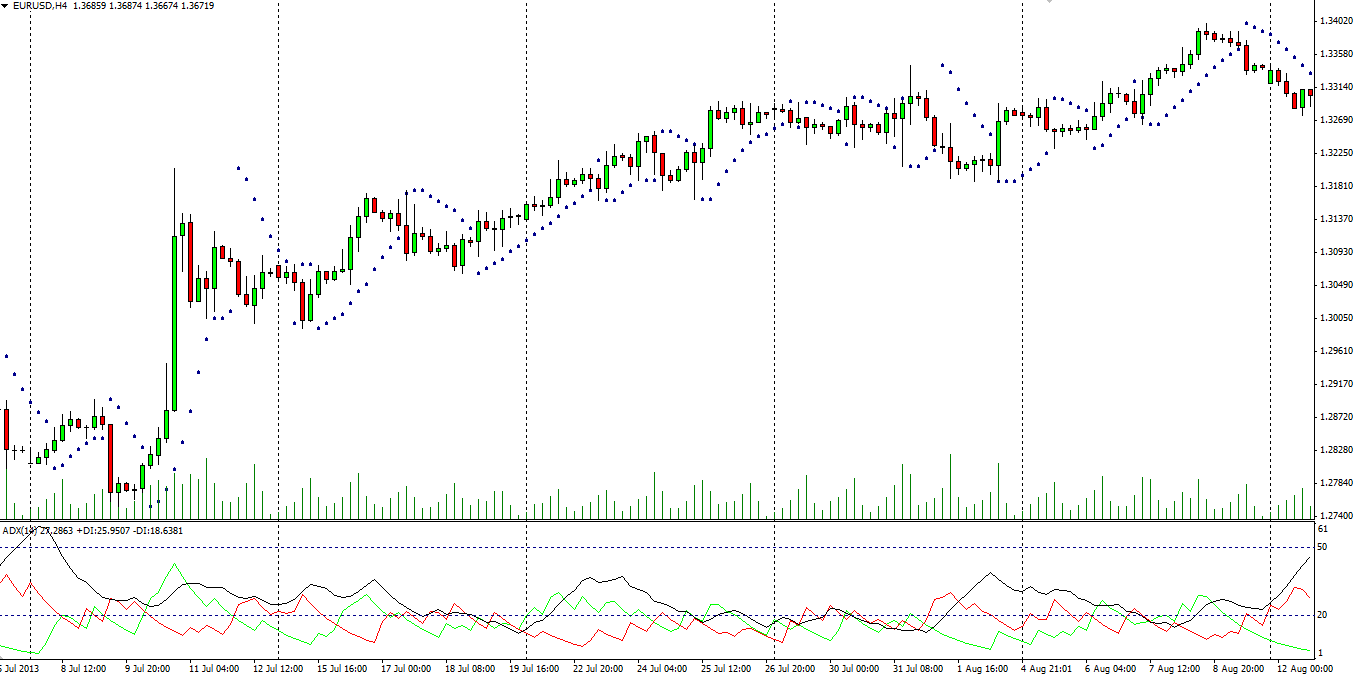
The screenshot below illustrates the combination of the SAR and the ADX.
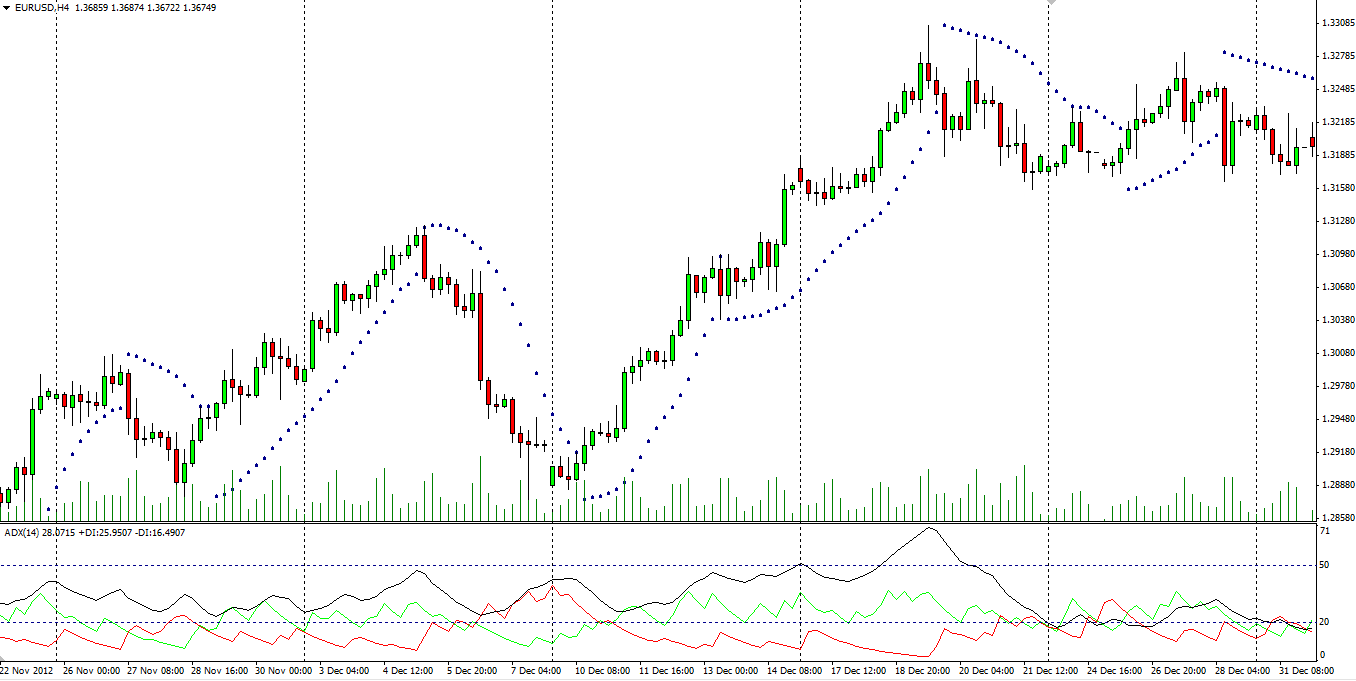
We mentioned in the previous article “Average Directional Movement Index” that, by default, the minimum ADX level for entry points should be 25, as suggested by the inventor of the indicator, J. Welles Wilder. However, many traders prefer to use a level of 20, as it generates more buy/sell signals. This choice is generally up to each market player’s unique trading system. For our purposes, we will use the 20 level.
When exactly to enter
 After the market has started trending and our ADX line accelerates past the level of 20, signalling that the trend is strengthening, you can prepare to enter a position. But on which SAR dot should one enter, you might ask.
Well, there is no general rule for that and, as with almost everything else in forex, it depends on one’s unique trading system and personal preferences. It is, however, common for traders to wait for around two to four opposite dots to form before committing to ride the newly formed trend. In the screenshot below, we’ve used three dots in the opposite direction as confirmation of the price reversal. As usual, this system is not 100% bullet-proof, but it does yield satisfactory results. Here is an example.
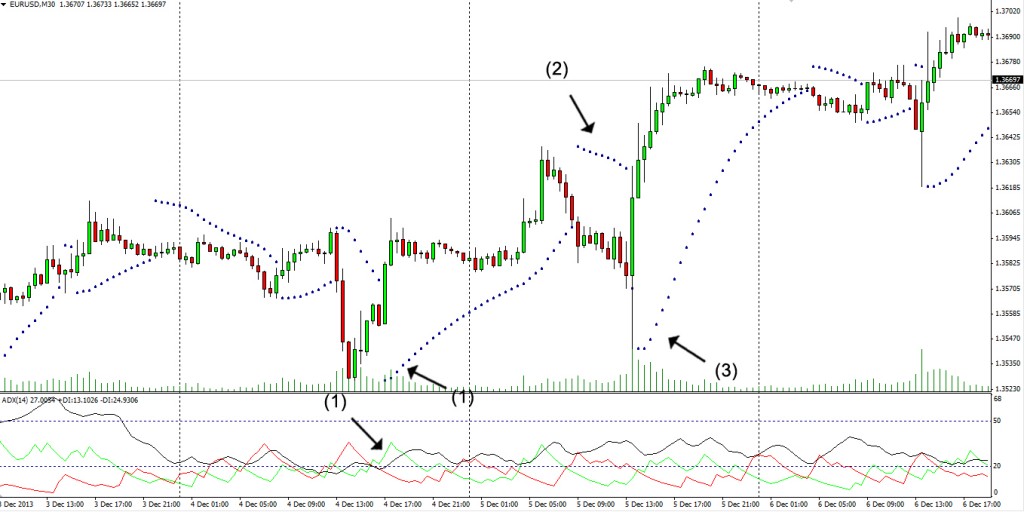
As you can see in the screenshot above, the ADX begins to accelerate past the 20 level at (1), shortly after it has rebounded from a low. This makes the current market conditions optimal and relatively safe for basing our trading decisions on the Parabolic SAR. Don’t forget to use a trailing stop to diminish the negative effect of a sudden price reversal. As the upward movement develops, a correction forms at (2), and, according to our strategy of exiting a position after three opposite dots have formed, we close our trade. After that, however, we enter a new long position at (3) after three new opposite dots have appeared, while the ADX continues to hold well above the level of 20.
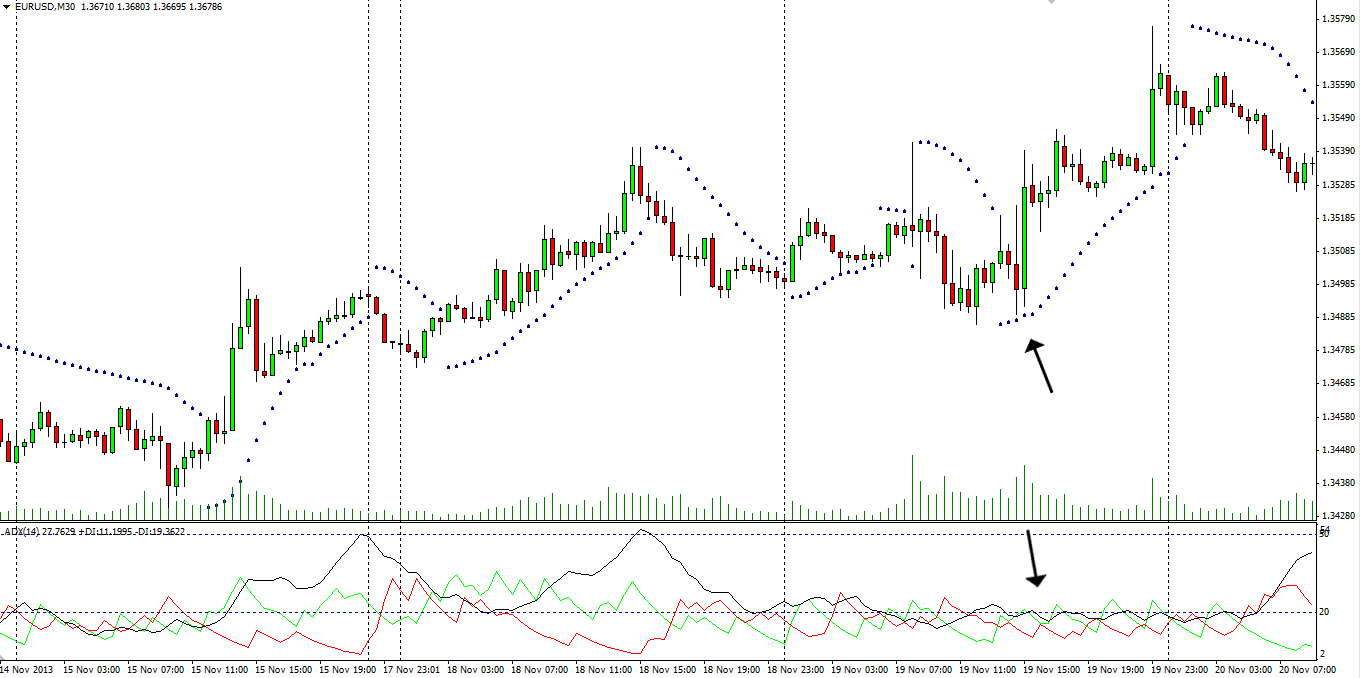
The reverse scenario is pictured below. You can see that the ADX is holding below our entry level because the market is trading sideways. This is a clear sign that you should refrain from basing your trading decisions on the SAR, even though it currently provides a buy signal.
Adjusting the SAR settings
 As mentioned earlier, the Parabolic SAR has two settings that you can fine-tune to achieve optimal coherence with your unique trading system – the step value and the maximum value.
The step value determines how sensitive the Parabolic SAR is to changes in the price action. The lower the setting, the less sensitive the indicator, whereas a higher setting will allow it to spot trend changes earlier.
Each extreme, however, has its drawbacks. If you use a less sensitive step, the SAR will generate more reliable signals, but they will lag behind, sometimes forcing you to enter a position near the end of the price movement. In the screenshot below, you can see how the minimum step affects the indicator.
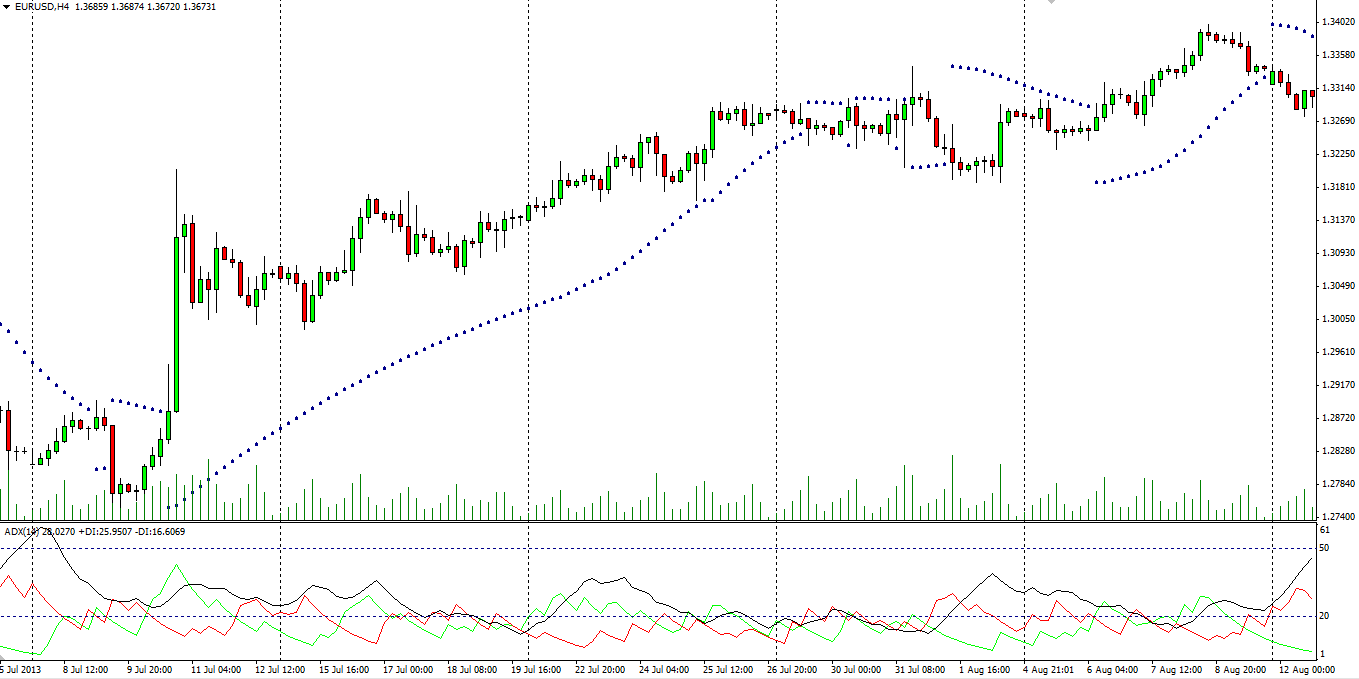
On the other hand, a maxed-out step value will produce many more on-time signals as it tracks the price action closely, but many of them will point to false trends and may therefore result in losses. The following screenshot reflects the same moment of the trade, but with the step value set to 0.08.
When you compare the two, you will notice that neither is exactly optimal. Therefore, a more balanced setting should be chosen. Each trader should decide what value to use based on detailed testing. It is advisable to start with the default settings and then conduct additional tests with manual ones.
Maximum value
 The second parameter you can adjust is the maximum value of the Parabolic SAR. Unlike the step value, however, it has very little impact on the way the indicator behaves. It simply limits the SAR’s adjustment at price extremes and ranges between 0.2 and 0.8. In other words, it restricts the effect of the “step value” setting rather than changing the SAR itself. It prevents the step value from rising exponentially during an extreme trend, which could skew the reading.