
 | Updated:
 - Jump to:
- Forex Brokers with Act Trade
- Act Trade Forex Brokers by Spread
- ActForex
- ActTrader’s Features
- Main Interface
- Order Execution
- Easy Navigation
- Graphics
- Price Alerts
- One-Click Trading
- Chart Trading
- Timeframes and Languages
- Other Products and Tools
- ActWebTrader
- ActVAT
- ActBinary
- The FXApps Store
- Mobile Products
- ActForex Product Lineup Expansion
ActForex develops several Forex trading platforms that are employed by some of the most reputable Forex brokers thanks to their functionality, reliability and safety. The company’s flagship product is ActTrader, but it also offers ActWebTrader, ActPhone, ActPad and ActDroid, all of which can be used via a web browser, tablet or smartphone.
 Plus500 USThis content applies only to Plus500 US and clients from the United States. Trading futures involves the risk of loss.
- eToro50% of retail investor accounts lose money
- Fusion Markets74-89% of retail's CFD accounts lose money
- FP Markets73.33% of retail investor accounts lose money
- Global Prime74-89% of retail CFD accounts lose money
- Pepperstone72.9% of retail investor accounts lose money





The ActTrader platform has come a long way over the past few years. The first version appeared in 2009, and its features were quite limited, so not many brokers took advantage of it.
Nowadays, it is regarded as the second-most capable Forex trading platform after MetaTrader 4, and, judging by current trends, it may soon become the most functional, reliable and widely used platform on the market.
How ActForex Came to Be
 The company behind this feature-rich trading platform, ActForex, hails from the United States. Its history dates back to the late 1990s, when the retail trading industry was still in its infancy. It all started in 1998, when Ilya Sorokin teamed up with a group of foreign-exchange and technology experts. Their cumulative efforts gave rise to ActForex, which was incorporated in 2000.
In the absence of online trading technologies, major banks and large corporations were the only institutions that could trade currency pairs, with the majority of trades being executed the old-fashioned way, over the telephone.
Online trading in equities was in its embryonic stage at the time, but interest in the retail foreign-exchange market was steadily growing. However, the development of an online platform for spot Forex trading seemed a daunting task, as software designers had to overcome various technical challenges. The availability of broadband internet was still rather limited.
Despite these technological obstacles, ActForex succeeded in developing ActTrader, a unique proprietary engine that laid the foundations for retail foreign-exchange trading. At the time, retail traders accounted for less than 20% of the overall volume traded on the Forex markets.
Both ActForex and its innovative creation have grown tremendously over the past two decades. ActTrader continues to be the platform of choice for many retail traders worldwide, providing them with a sophisticated yet intuitive interface and a host of useful features, which we cover in further detail below.
The company continues to update its unique ActTrader platform, introducing new and improved functionalities to the benefit of retail traders and brokers alike. It has greatly expanded its product lineup with the introduction of new modular platforms based on its legendary ActTrader engine.
Apart from spot Forex, its software currently supports trading in a range of financial instruments, including options, commodities, futures, contracts for difference (CFDs), forwards, cryptocurrencies and exchange-traded funds (ETFs).
ActTrader’s Features at a Glance
 Despite yielding ground to extremely popular platforms like MetaTrader 4 and MetaTrader 5, ActTrader remains appealing thanks to its useful features, which both experienced and beginner traders will appreciate. The software offers a user-friendly interface combined with tools that can certainly help you become a better trader.
Users enjoy great flexibility, with a choice of downloadable, browser-based and mobile-compatible versions for Android and iOS. In the paragraphs that follow, we cover the most distinctive features of the downloadable ActTrader, intended for use on desktop computers running Microsoft Windows.
Main Interface
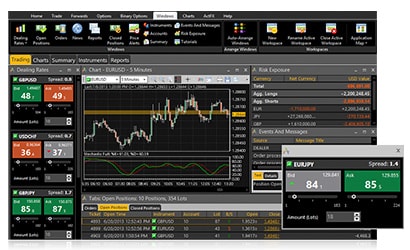 Once you register with a brokerage that uses ActTrader, you will immediately notice how easy it is to find your way around the platform. The main interface features some general tips and a set of training videos designed to familiarize you with the platform and its key functionalities.
The main workspace is intuitive, neat and very easy on the eye. Everything is well-organized, with users having various customization options to tailor their overall experience to their individual preferences.
We strongly recommend watching the videos if you want to take full advantage of ActTrader’s capabilities. Of course, the interface is quite simple, so you will quickly learn to use it even without watching the tutorials.
Your account number, available balance, used margin, equity and net earnings/losses are clearly displayed in the upper part of the screen via the Account Information Bar, giving you all important details at a glance.
The main navigation menu is located vertically on the left side of the screen. You initiate orders with the Trading button, while the Catalog button leads you to the list of tradable Forex pairs and the other financial instruments the platform supports.
The Options button allows you to trade options. Charts for currency pairs are loaded via the Chart button, while the Windows section shows detailed information about your pending orders and open and closed positions. Users also have access to customization tools via the Layout section. Important financial news releases are available in the Info section.
Order Execution and Response Times
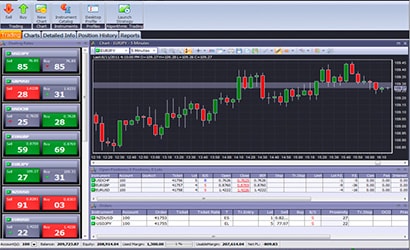 ActTrader is an uncluttered and highly responsive trading platform that stands out with quick and hassle-free order execution. Placing orders is simple and straightforward. Requotes are issued only rarely, usually during significant and unexpected price movements.
You can open a trade within a split second by clicking the oversized Buy/Sell buttons next to your preferred currency pair, located immediately under the Home tab. The platform also enables users to set Stop and Limit orders by selecting the boxes that read ‘preset stop’ and ‘preset limit’.
It is also possible to modify the stop-loss and take-profit levels on active orders. To do this, simply navigate to the Windows menu and choose Open Positions to see your trades. Then right-click on the chosen position and enter your preferred stop/limit parameters. All in all, ActTrader supports six order types – Entry Buy Stop, Entry Sell Stop, Entry Buy Limit, Entry Sell Limit, Market Buy and Market Sell.
Easy Navigation
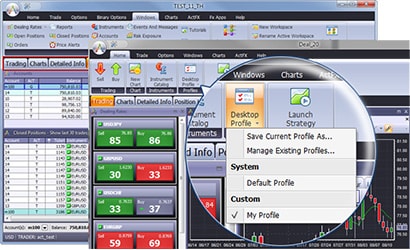 ActTrader is extremely easy to navigate, making it particularly suitable for beginners who have recently joined the Forex trading community. Users have the FXVoyager Toolbar to thank for this ease of navigation. The toolbar is intuitive, which facilitates maximum efficiency.
All commands are organized into neat groups, with each group corresponding to a distinct activity. The tabs in the FXVoyager Toolbar give you instant access to charts, the options and binary options markets, and the FXApps Store, where users can find different strategies for algorithmic trading.
Graphics and Visual Presentation
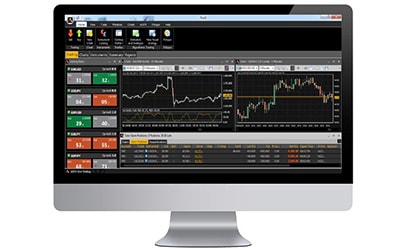 Despite being one of the oldest platforms for retail foreign-exchange trading, ActTrader refuses to age. We attribute this to the frequent updates the ActForex developers introduce to the software. Oddly enough, it looks more sophisticated in terms of graphics than other commonly used platforms such as MT4.
What’s great is that visual appeal does not come at the expense of functionality or user-friendliness. Traders can easily tailor the workspace to their individual preferences with the help of detachable windows.
All buttons and tabs are designed for easy, rapid recognition. It takes very little time to become accustomed to this neat interface and navigate ActTrader with ease.
Price Alerts
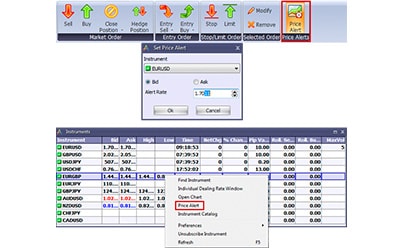 Price alerts are among the most useful features ActTrader has to offer. This functionality informs users when the prices of specific financial instruments reach or exceed a predetermined level. When this happens, the software notifies you with a distinct sound effect and a pop-up message.
There are two ways to set a price alert. You can do so by right-clicking on your preferred financial instrument in the Dealing Rates section and then selecting Price Alerts from the context menu.
The easier option is to use the FXVoyager Toolbar, where you simply select the oversized Price Alerts button. Keep in mind that each price signal is triggered only once; the software removes it automatically when you hit the OK button. You can also set alerts that notify you when chart candles penetrate specific trend lines.
One-Click Trading
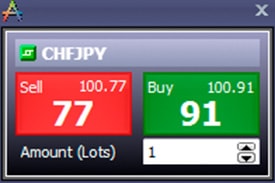 Like other popular platforms such as MT4 and MT5, ActTrader is equipped with a dedicated one-click trading feature. As the name suggests, it enables the user to open a new position for a given number of lots with a single mouse click. You can enable or disable one-click trading from the main settings menu.
Chart Trading and Indicators
ActTrader provides a decent range of real-time charts and graphical objects to aid users in making swift yet informed trading decisions. The platform supports three main types of charts: bars, lines and candlesticks. Creating your own personalized charts is also possible.
Users can attach graphical objects to a single chart or link them across several charts. All details are clearly visible for maximum efficiency. A helpful toolbar gives you instant access to features such as zooming in and out, and tools for drawing, saving and printing your charts.
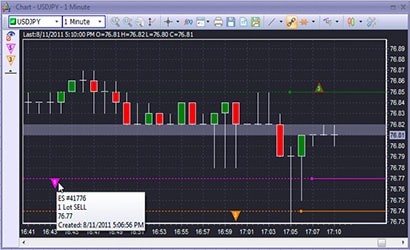 It is also possible to draw objects to copy and paste on your charts. ActTrader is equipped with more than thirty indicators that allow traders to perform technical analysis. Creating your own indicators is also an option.
Some of the most commonly used ready-made analysis tools include Bollinger Bands, Ichimoku Kinko Hyo, Gann Swing, the Chandelier Stop and the Linear Regression. Textual content can be plotted directly onto your charts. Chart templates can be saved for future use, along with their applicable settings and indicators.
Trading directly through charts is easily one of the most useful features incorporated into ActForex’s downloadable platform, as is creating and adjusting stop-loss and take-profit parameters. Chart users have all their positions, orders and price alerts at a glance. They can execute market orders by clicking anywhere on their charts.
Timeframes and Languages
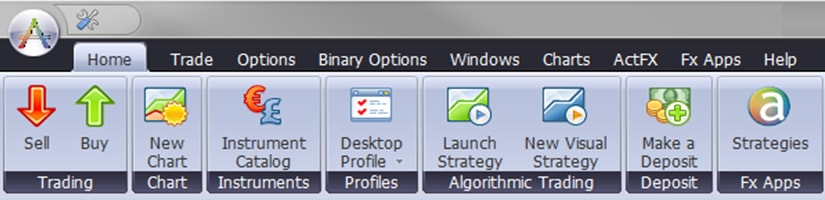
ActTrader gives users a choice of 11 timeframes on charts, ranging from as little as one minute to a whole month. These are also available in the free native apps ActDroid and ActPhone. ActForex caters to its multinational customer base by offering several languages. ActTrader users can conveniently manage their accounts and trading portfolios in Russian, English and Japanese.
Other Products and Tools Developed by ActForex
ActForex strives to ensure utmost flexibility and convenience for all traders who use its platform and products. In addition to the downloadable desktop software, users can access the platform directly in their web browsers without installing anything.
This is particularly beneficial for those who use desktop computers running Linux or macOS, because the downloadable software was designed for Microsoft Windows only. Trading on the go is made possible via the dedicated apps ActDroid, ActPad and ActPhone. The company recently released a visual strategy editor that enables traders to devise their own automated strategies without having to write any code.
ActWebTrader
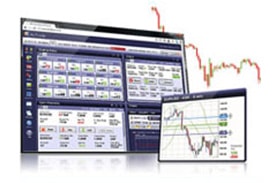 Traders who want to skip the download and installation of the Windows-based ActTrader software can use its browser-based counterpart, ActWebTrader. You need to enable JavaScript in your browser to use this, however. Apart from that, the application is optimized to run in any web browser, including Google Chrome and Mozilla Firefox.
ActWebTrader is just as easy to navigate and work with as its downloadable version. The interface is also rather similar, so you will experience no hassles when switching between the two. In addition, it supports the vast majority of features and functions of ActTrader, including single-click trading, market or conditional entry orders with stops and limits, graphical objects, technical indicators and trading through charts.
There are two main view modes: simplified and detailed. ActWebTrader enables you to monitor your orders, price alerts and positions or filter them based on different parameters. It is also possible to export and save your chart data in Excel. Browser users can collapse, expand or nest their windows within one another.
Visual Algorithmic Trading via ActVAT
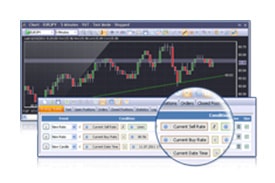 The ActVAT feature is particularly useful to traders keen on creating custom strategies for automated trading. The best part is that you can do this without any programming knowledge. With ActVAT, you can design fully customizable robots for automated trading straight from chart objects.
You simply load a chart and draw a trend line on it. Being automated, the strategies you devise will open positions whenever prices reach the trend line, without your interference. The robots can also close positions at certain times in the future, based on conditions of your choice.
ActBinary
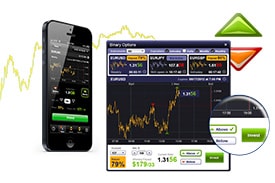 As mentioned earlier, ActForex has expanded its selection of financial instruments well beyond currency pairs. ActBinary is a simple-to-use module of the ActTrader software that allows you to trade exclusively in binary options.
With this financial instrument, traders usually earn a flat payout provided that their binary options expire ‘in the money’. Trading binary options is considered highly volatile and is even prohibited by law in some jurisdictions, such as the United Kingdom and Canada.
Using ActBinary as a standalone platform is also possible. Furthermore, there is no need to open a separate account for this purpose; you can access ActBinary with your existing sign-in credentials for ActTrader.
The module is compatible with web browsers, iPhones and Android-based tablets and smartphones. ActBinary has much to offer in terms of useful features, including availability in more than twenty languages and various options for customization.
The FXApps Store
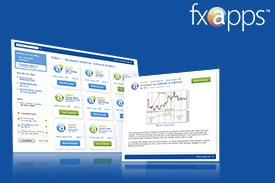 FXApps is another unique product that distinguishes developer ActForex from the competition. This dedicated application store enables ActTrader users to compare and purchase different algorithmic strategies. There is a multitude of options for strategy traders here, including the Alligator, Down Hammer, Up Hammer, DIBS and Accelerator/Decelerator strategies.
Another advantage of FXApps is that it is open to all application developers. Anyone can create and upload content to the store using ActForex’s scripting language, ActFX. Of course, the content must be reviewed and approved before it is finally uploaded to the FXApps platform.
Trading Opportunities in the Palm of Your Hand
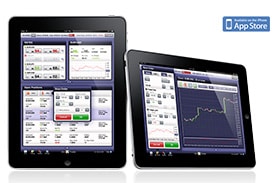 Apart from its downloadable and web-based desktop platforms, ActForex caters to users with a wide range of mobile products, compatible with major operating systems such as iOS and Android. Each of these mobile solutions is full-featured and enables smartphone users to trade the same financial instruments supported by the desktop ActTrader, such as currency pairs, leveraged CFDs, ETFs and futures.
Mobile traders will benefit from a host of great features including real-time price quotes and highly interactive charts. The apps allow you to monitor all activities in your trading account, from pending orders and the performance of open positions to your current balance, used margin and equity.
Additionally, you can review the complete history of your past trades while on the move. A live news stream keeps you up to date with the latest economic events. All account-related data and trading activities are accurately synchronized in real time.
ActForex Product Lineup Expansion for Brokers and Fund Managers
As an industry veteran, ActForex constantly strives to stay ahead of the latest trends and remain on par with the competition, especially now that there is a greater choice of online retail trading platforms. The software company achieves this by continually expanding its product lineup. Below are some of the latest additions that brokers and fund managers can benefit from.
- enterpriseFX is a platform whose customization capabilities provide market makers with optimal control over the trading experience they offer customers. DD brokers can use it to generate reports and exercise better control over their spreads. It also helps them introduce institutional clients to their customer base.
- ActFundManager is geared mostly toward the needs of hedge-fund managers, allowing them to execute trades on behalf of their investors. Their investments are traded via managed accounts, but the earnings and losses are allocated among the participants in the fund in real time. The platform works with PAMM and LAMM managed accounts. Fund managers also get to choose their preferred liquidity providers. Both the ActTrader and ActCharts modules are incorporated in ActFundManager.
- ActIBroker works to the advantage of introducing brokers and new trading companies. It enables them to break into the retail trading market without high IT expenses and market risks. This solution was designed specifically for companies without full-time dealing desks. The included modules are ActTrader, ActCharts and ActAdmin, the platform’s back-office solution.